 socialhead
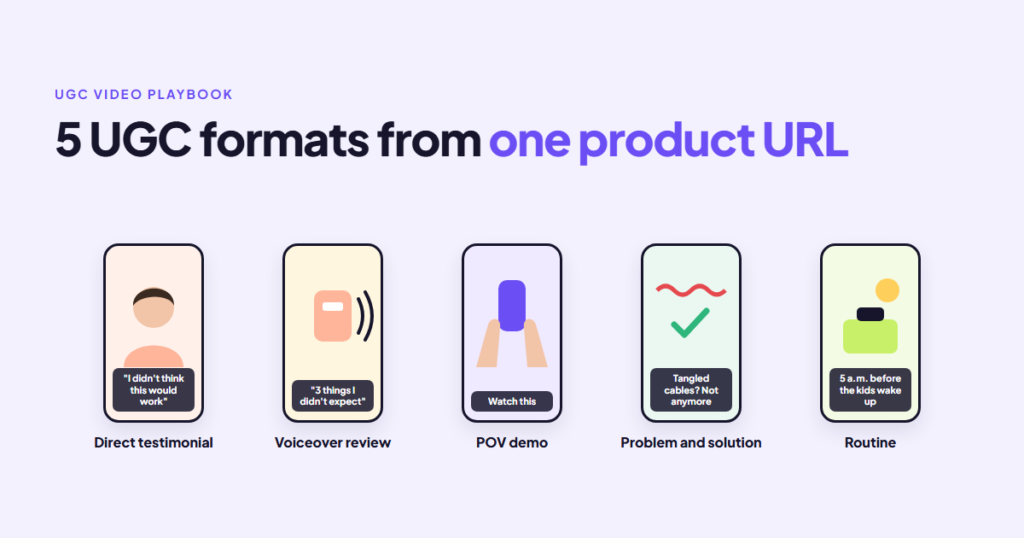
UGC video works on social because it doesn’t look like an ad. A person holds the product, talks about it, and uses it the way a friend would. The hard part for most stores isn’t believing in UGC. It’s producing enough of it, in enough different styles, to find the one that sells.
There are five UGC video formats that cover most product ads, and each one suits a different kind of product and buyer. You no longer need five creators to make them: a product URL to video AI tool can read your product page and draft each format with an AI creator presenting it. Below is what each format does, when to use it, and how to get all five from one product link.
Key takeaways
- Different formats answer different buyer questions: “does it work”, “what is it like”, “how do I use it”, “why do I need it”, “does it fit my life”.
- Match the format to the product before you match it to the platform.
- Make the same product in two or three formats and let the results choose.
- The first two seconds matter more than the production quality.
- Every format still needs an honest view of the real product.
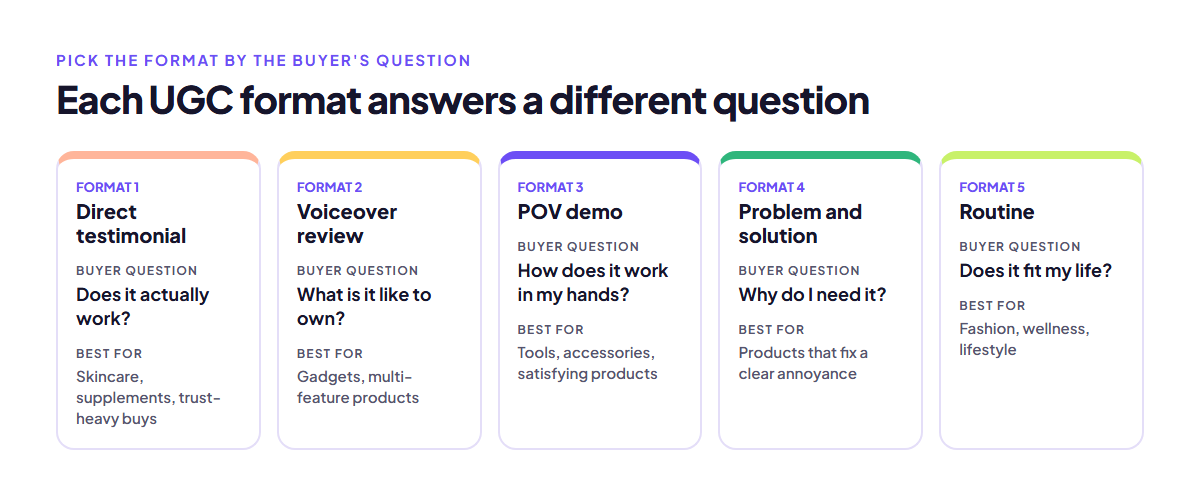
Table of Contents
Why format matters more than polish on TikTok and Reels
On TikTok and Instagram Reels, people scroll fast and decide in a second or two whether to keep watching. A polished studio video can lose to a shaky phone clip because the clip looks like content from someone they’d follow, not a brand trying to sell.
The format sets what the viewer expects in those first seconds. A testimonial promises an opinion. A POV demo promises to show the product working. A problem and solution video promises an answer to something annoying. Pick the wrong format for the product and even a good video can underperform. For more on why video carries so much weight on social, see the role of video in social media marketing.
The 5 UGC video formats
1. Direct testimonial
A creator looks into the camera and says why they like the product. It is the closest format to a real recommendation.
- Best for: products where trust matters most, like skincare, supplements, and anything people worry about wasting money on.
- Hook idea: start with the result or the doubt. “I didn’t think this would work on my skin, but…”
- Watch out for: claims the product can’t back up. A testimonial that overpromises can get the ad rejected and drive returns.
2. Voiceover product review
Product shots on screen, with a creator’s voice talking through what they like and what to know. Nobody has to appear on camera.
- Best for: products with several features to explain, like gadgets, kitchen tools, and bags with clever compartments.
- Hook idea: name the one feature that surprised the reviewer.
- Watch out for: a list of features with no reason to care. Tie each feature to a moment of use.
3. POV product demo
First-person footage: the viewer sees hands using the product, as if they were holding it.
- Best for: products whose value is easy to see, like cleaning tools, beauty applicators, phone accessories, and anything satisfying to watch.
- Hook idea: open on the most satisfying second of use, then explain.
- Watch out for: slow starts. POV works because it shows the result fast.
4. Problem and solution
Start with something annoying the viewer recognizes, then show the product fixing it.
- Best for: products that solve a clear, common frustration: tangled cables, back pain at a desk, pets shedding on the sofa.
- Hook idea: show the problem in the first second, without explaining it.
- Watch out for: exaggerated problems. If the “before” looks fake, viewers stop trusting the “after”.
5. Routine or day in the life
The product appears inside a real daily routine: a morning skincare routine, a gym bag packed for the day, a work-from-home setup.
- Best for: lifestyle products, fashion, wellness, and anything bought as part of an identity rather than for one feature.
- Hook idea: a recognizable moment, like “5 a.m. before the kids wake up”.
- Watch out for: losing the product in the scene. It should be the clear star at least twice.
Which UGC video format fits your product
| Product type | Start with | Then test |
|---|---|---|
| Skincare, supplements | Direct testimonial | Routine |
| Gadgets, tools | POV demo | Voiceover review |
| Problem-solving items | Problem and solution | POV demo |
| Fashion, accessories | Routine | Direct testimonial |
| Multi-feature products | Voiceover review | Problem and solution |
TikTok and Reels both reward native-looking vertical video, so the same formats work on both. Facebook Feed is more forgiving of slightly longer videos and voiceover reviews, since many people watch with the sound off and rely on captions.
How to make all five formats from one product URL
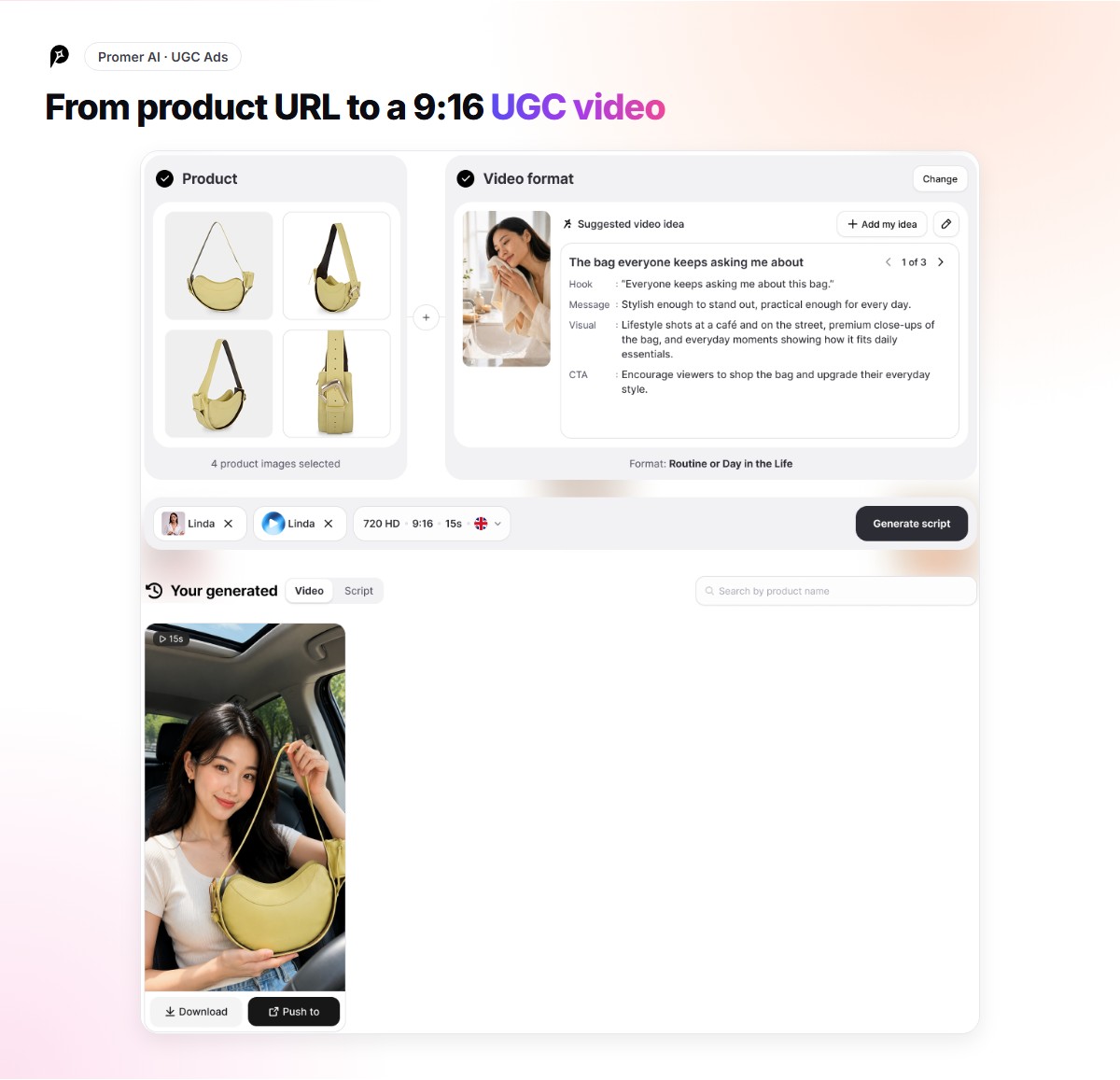
Briefing five creators for five formats takes weeks. With a product link to video tool, the product page does most of the briefing.
Here is how it works in Promer AI:
- Paste the product link. Promer AI reads public pages from Shopify, Amazon, Etsy, eBay, and most other stores, and pulls the product name, images, description, and price. You can pick up to eight product images to use.
- Get a video idea. It suggests an idea with an angle, hook, visuals, and call to action, and marks the best-match format out of the five above. Switch to another format and you get a new idea and script written for it.
- Pick a creator and a voice. Choose from more than 5,000 AI creators and more than 15,000 voices, filtered by things like age, region, and language.
- Review the script. Edit any scene or line of voiceover before anything is generated.
- Generate and publish. Export in 9:16 or 16:9, push to Facebook, Instagram, or TikTok, or launch on Meta Ads.
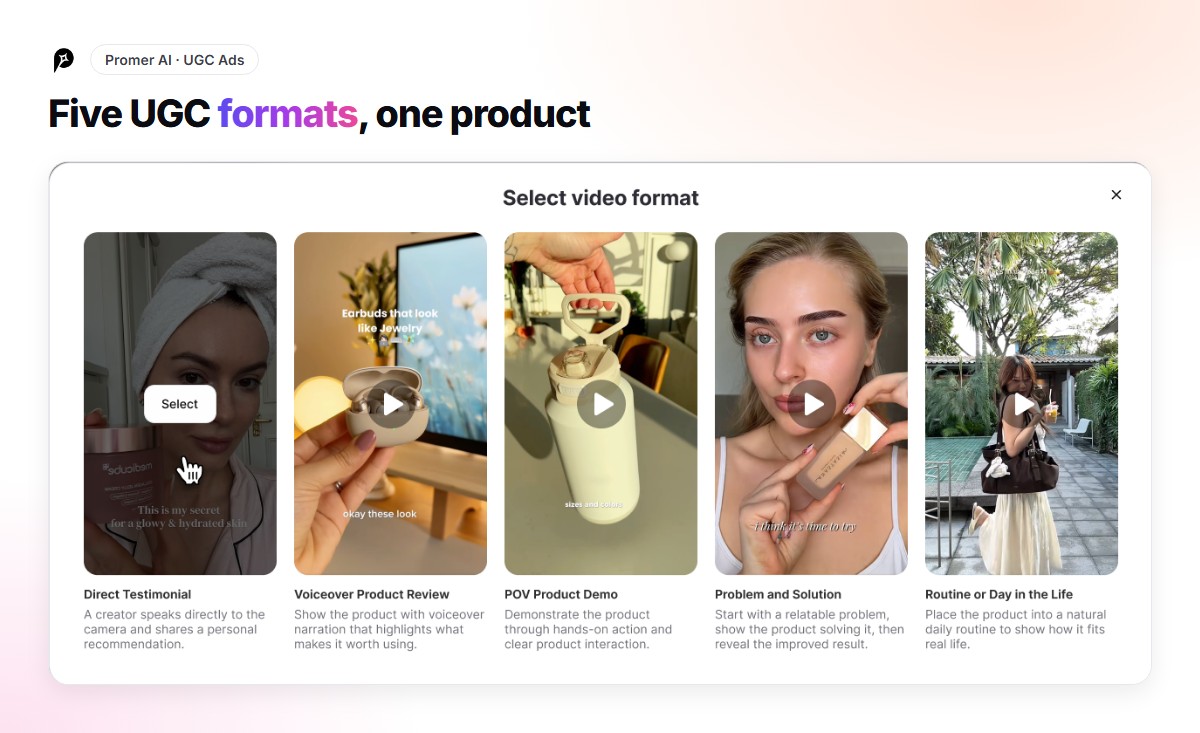
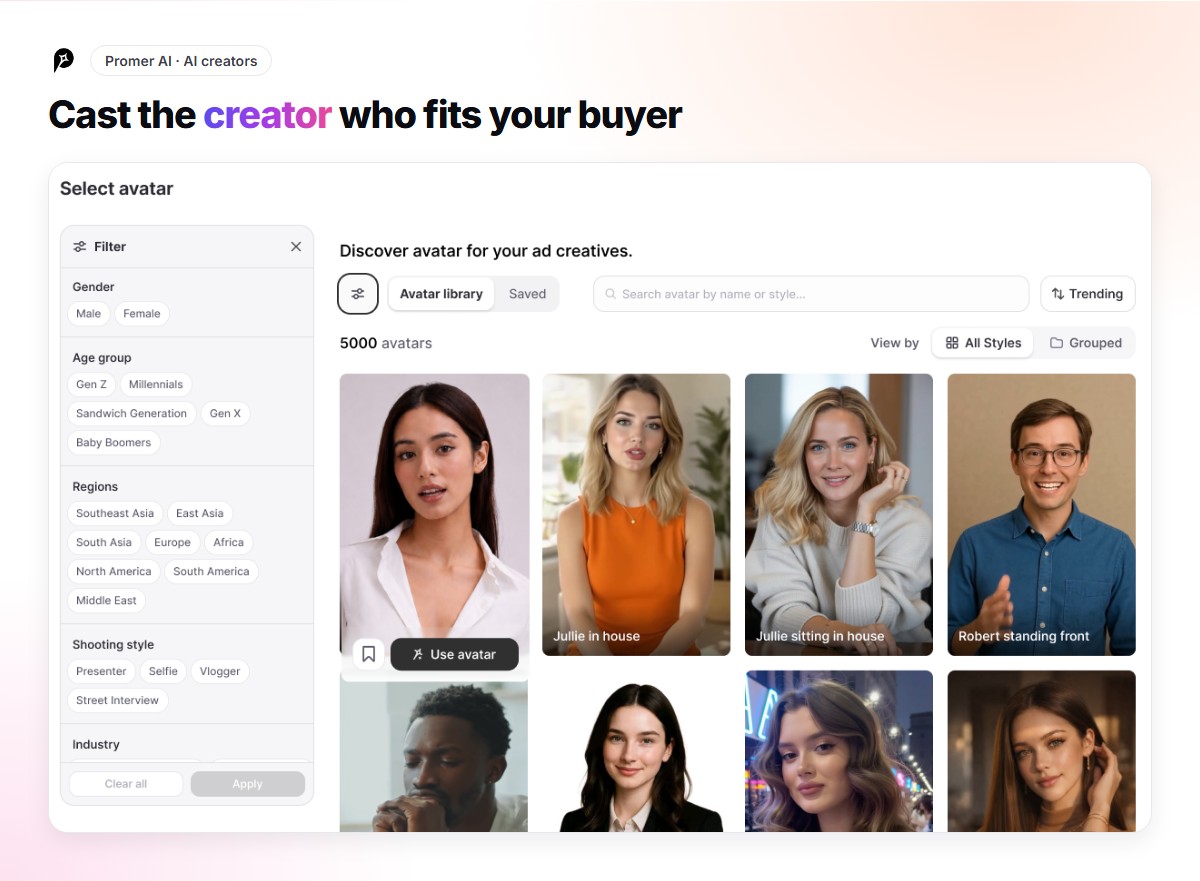
Making the same product in two or three formats is the useful part. A POV demo and a problem and solution video for the same product often perform very differently, and you can’t predict which one will win.
When you only have a photo
Sometimes there is no product page to paste: a new product not yet listed, a page behind a login, or a single hero shot from a photographer. You can still make social video from it.
Upload the product images directly instead of a link. And if the goal is a short motion clip rather than a full UGC video, for a Story, a Reel cover, or a product page loop, a product image to video AI tool can animate a still photo into a few seconds of movement.
Either way, check the result against the real product. Colors, labels, and proportions should match what the customer will receive.
Common mistakes with UGC video ads
- Using one format for every product. A testimonial won’t sell a satisfying gadget as well as a POV demo will.
- Slow openings. If the first two seconds are a logo or a greeting, most viewers are gone.
- No captions. Many people watch with the sound off. Captions keep the message in.
- Overclaiming. UGC feels personal, which makes false claims feel worse. Keep it to what the product actually does.
- Never refreshing. Even a winning format tires. Make new hooks in the same format before it fades.
FAQ: UGC video formats
What are the main types of UGC video?
For product ads, five formats cover most needs: direct testimonial, voiceover product review, POV product demo, problem and solution, and routine or day in the life.
Which UGC format works best on TikTok?
There is no single best format. POV demos and problem and solution videos tend to suit TikTok’s fast pace, but the product decides more than the platform does. Test two formats per product.
Can AI make UGC videos from a product link?
Yes. Product link to video tools read the product page, write a script, and generate a video with an AI creator presenting the product. You should still review the script and the product visuals before publishing.
How long should a UGC video ad be?
Most product UGC ads run between 15 and 30 seconds. Shorter is usually safer for the first test, and longer formats like routines can work once you know the angle sells.
Finding the right UGC format used to take weeks of briefing and waiting on creators. Now one product link can produce all five formats in an afternoon, so you can test them against each other and keep making more of whichever one wins.



 socialshop
 socialpublish
 socialreply
 socialwidget